
系统母版面板
编辑模式支持通过 ui.masterTemplatePanel 开启母版面板,通过 masterTemplates.listSystem(从 2.16.0 起支持)提供系统母版列表。用户可以在画板内查看封面、预览母版,并将选中的母版应用到当前画板。
宿主也可以通过 mode.setMasterTemplate() 主动应用母版,支持编辑模式和演示模式。
演示示例
- 母版面板数据配置:以编辑模式打开,了解母版列表的数据配置,并通过画板的「母版」入口预览和应用母版。
- 编辑器 UI 配置示例:通过
ui配置开启或关闭母版面板。
接入步骤
- 准备母版 JSON 内容,可从母版管理页创建/编辑并导出,或使用 SDK 示例数据。
- 创建编辑器时设置
ui.masterTemplatePanel: true。 - 在
masterTemplates.listSystem中返回母版数组,每项包含id、name和content。 - 用户打开「母版」面板,在「系统母版」中预览或应用母版。
接入示例一:本地数据
将两个示例 JSON 文件部署到宿主站点的 /templates/ 目录,再由回调读取文件内容:
import {
  createEditor,
  type MasterTemplateCallbacks,
  type MasterTemplateItem,
} from '@dajiaoai/algeo-sdk';

const sources = [
  {
    id: 'black-white-six-styles',
    name: '黑白排版',
    url: '/templates/黑白-风格母版-六主题.json',
  },
  {
    id: 'color-ppt-sixteen-styles',
    name: '彩色 PPT 动态讲解',
    url: '/templates/彩色PPT-动态讲解-十六主题.json',
  },
];

const masterTemplates: MasterTemplateCallbacks = {
  async listSystem(): Promise<MasterTemplateItem[]> {
    return Promise.all(
      sources.map(async ({ id, name, url }) => {
        const response = await fetch(url);
        if (!response.ok) {
          throw new Error(`${name}加载失败(HTTP ${response.status})`);
        }
        return { id, name, content: await response.text() };
      }),
    );
  },
};

const editor = await createEditor(
  document.getElementById('algeo-editor')!,
  {
    auth: { appId: 'your-app-id' },
    ui: { masterTemplatePanel: true },
    masterTemplates,
  },
);

// 运行时隐藏或显示面板。
await editor.mode.setUiConfig({ masterTemplatePanel: false });
await editor.mode.setUiConfig({ masterTemplatePanel: true });
接入示例二:使用业务接口
listSystem 也可以查询宿主自己的接口。下面假设接口直接返回符合 MasterTemplateItem[] 的 JSON 数组:
import type {
  MasterTemplateCallbacks,
  MasterTemplateItem,
} from '@dajiaoai/algeo-sdk';

const masterTemplates: MasterTemplateCallbacks = {
  async listSystem(): Promise<MasterTemplateItem[]> {
    const response = await fetch('/api/system-master-templates', {
      credentials: 'include',
    });
    if (!response.ok) throw new Error('获取系统母版失败');
    return response.json();
  },
};
若业务接口返回 { items: [...] } 等结构,需要在回调中提取数组,并将业务字段映射为 SDK 的字段名称。宿主接口的鉴权由回调中的请求处理。
通过 API 设置母版
实例创建完成后,宿主可以调用 mode.setMasterTemplate(template) 应用母版。该方法可以独立于母版面板使用。
参数与返回值
| 项目 | 类型 | 说明 |
|---|---|---|
template | string | 完整的母版 JSON 字符串。可从母版文件读取,或使用母版列表项的 content。 |
| 返回值 | Promise<{ success: true }> | 母版应用成功后完成;应用失败时 Promise 被拒绝。 |
编辑模式
editor.mode.setMasterTemplate(template) 将传入的母版设置为当前工程的母版,并应用到所有已有画板。后续新增画板继承该工程母版。
import { createEditor } from '@dajiaoai/algeo-sdk';

const editor = await createEditor(
  document.getElementById('algeo-editor')!,
  {
    auth: { appId: 'your-app-id' },
    shareId: 'your-share-id',
  },
);

const response = await fetch('/templates/master-template.json');
if (!response.ok) throw new Error('加载母版失败');

const templateContent = await response.text();
const result = await editor.mode.setMasterTemplate(templateContent);
console.log('母版已应用:', result.success);

// 获取包含工程母版的最新内容,交给宿主的业务接口保存。
const projectContent = await editor.document.getContent();
工程母版保存在工程内容的 templateStyle 中。宿主保存 getContent() 返回的完整工程内容后,再次加载该内容时可以恢复母版设置。
如果宿主已有 MasterTemplateItem 列表,可以直接将选中项的 content 传入该方法。
演示模式
presentation.mode.setMasterTemplate(template) 将母版样式应用到当前实例中所有已加载的画板。
import { createPresentation } from '@dajiaoai/algeo-sdk';

const presentation = await createPresentation(
  document.getElementById('algeo-viewer')!,
  {
    auth: { appId: 'your-app-id' },
    shareId: 'your-share-id',
  },
);

const response = await fetch('/templates/master-template.json');
if (!response.ok) throw new Error('加载母版失败');

const templateContent = await response.text();
await presentation.mode.setMasterTemplate(templateContent);
演示模式的调用用于更新已加载画板的展示样式,不写入工程的 templateStyle。加载其他内容后,如需使用同一母版,应在加载完成后再次调用。
展示与应用行为
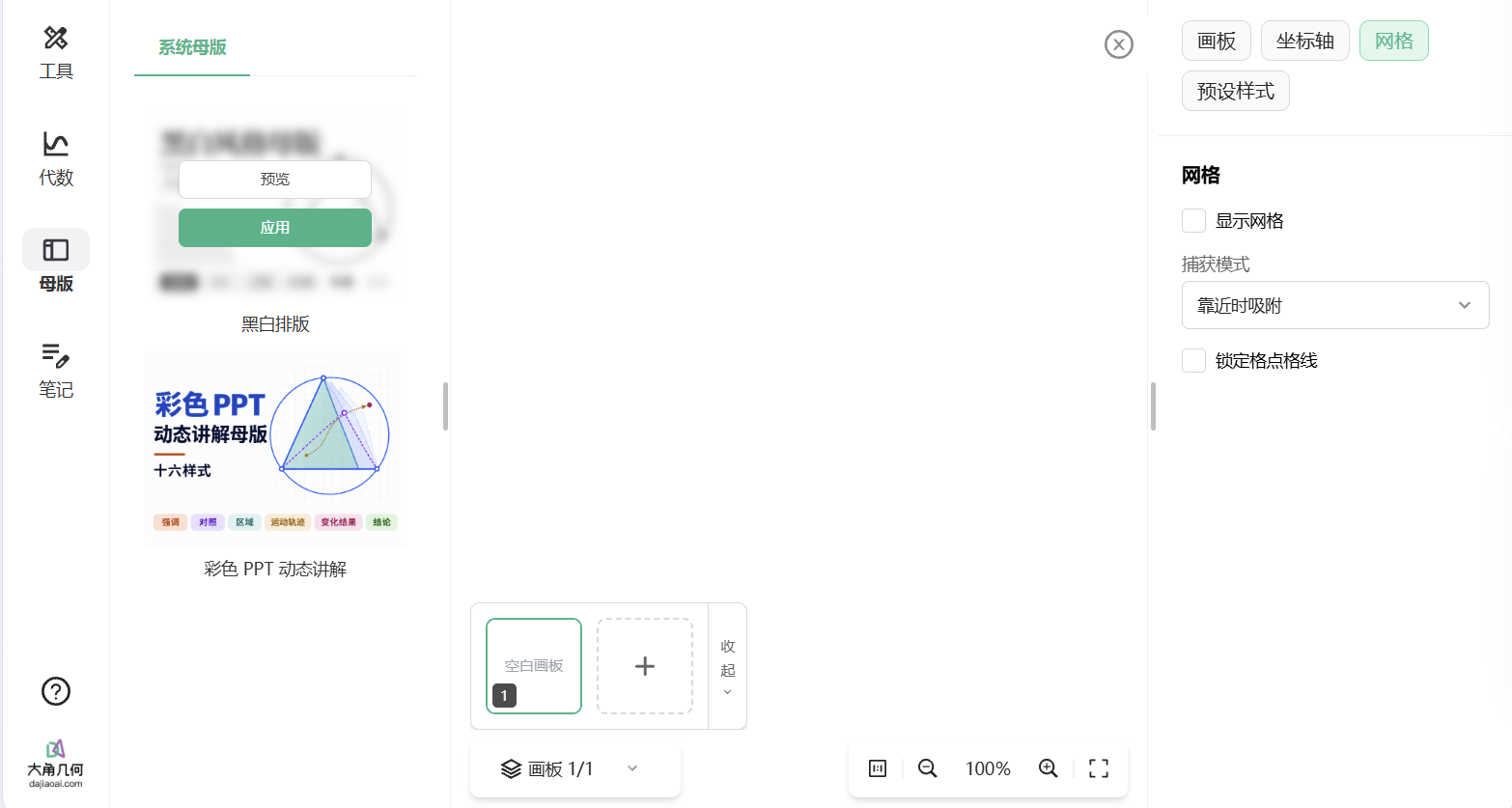
点击列表的「预览」可查看封面和母版内容;点击列表或预览弹窗中的「应用」,将母版应用到当前画板。
应用范围如下:
| 操作 | 应用范围 |
|---|---|
| 母版面板内的「应用」 | 当前画板。 |
editor.mode.setMasterTemplate(content) | 设置工程母版,应用到所有已有画板,后续新增画板继承该母版。 |
presentation.mode.setMasterTemplate(content) | 当前实例中所有已加载的画板。 |
错误与请求生命周期
setMasterTemplate()接收的内容应符合母版格式。内容无效或应用失败时,调用方通过try/catch处理被拒绝的 Promise。- 回调中可以抛出
Error,其message会随加载失败提示展示。 - 画板等待母版查询结果的超时时间为 60 秒。宿主可在
listSystem内为自己的请求设置超时。 - 实例销毁后,SDK 不再回传未完成查询的结果。宿主如需终止自己的网络请求,可自行管理
AbortController。
常见问题
开启开关后仍看不到系统母版 Tab
检查创建编辑器时是否同时提供 masterTemplates.listSystem 函数。面板开关控制入口,回调配置决定系统母版 Tab 是否显示。
母版名称显示正常,但没有封面
检查 JSON.parse(item.content).previewPngUrl 是否存在,以及该地址能否直接加载图片。
列表加载失败
检查回调是否返回数组、ID 是否为空或重复、content 是否为字符串。使用业务接口时,还需确认接口成功返回,并在回调中完成必要的字段映射。