
Scenarios
If you prefer to start from “what kind of product am I building?”, this page is the better entry point. Each scenario below maps to recommended capability units and a representative integration example.
How to read this page
- Want to know whether your product is a fit: jump to the scenario closest to your business.
- Want to know what to integrate: check the “Recommended capability units” under each scenario.
- Want clearer capability boundaries first: return to Capabilities.
Scenario-to-capability mapping
| Scenario | Core goal | Recommended capability units |
|---|---|---|
| Online Education and Smart Classrooms | Make abstract geometry dynamic inside teaching flows | Embedded Presentation Canvas, Embedded Editor Canvas, AI Agent Geometry Interaction |
| Digital Question Banks and Content Platforms | Lower figure production cost and improve exercise interactivity | Embedded Presentation Canvas, Geometry Protocol and JS SDK, Image and Structured Export, HTTP API Server-side Integration |
| AI Tutoring | Let models reason with geometry and deliver more vivid explanations | AI Agent Geometry Interaction, Geometry Protocol and JS SDK, HTTP API Server-side Integration |
| Enterprise Content Production AI Agent | Connect lesson plans, visuals, courseware, and geometry in one automated production workflow | AI Agent Geometry Interaction, Geometry Protocol and JS SDK, Image and Structured Export, HTTP API Server-side Integration |
| Lesson Plan and Courseware Authoring Tools | Let curriculum teams produce geometry directly in their own systems | Embedded Editor Canvas, Image and Structured Export, HTTP API Server-side Integration |
| Independent Developers and Math Innovation Tools | Reuse mature geometry infrastructure and focus on product innovation | Geometry Protocol and JS SDK, Image and Structured Export, HTTP API Server-side Integration |
1. Online Education and Smart Classrooms
This is the most typical teaching-display scenario. The goal is to insert dynamic geometry naturally into classroom and learning workflows.
You may be building
- Online classroom products
- Interactive lesson pages
- Courseware playback systems
- Learning tablets or classroom large-screen systems
Recommended capability units
Why it fits
- Static figures can become draggable, demonstrable, and replayable learning content.
- If your teaching system includes an AI assistant, the assistant can draw while explaining.
Typical examples
- A teacher explains congruent triangles with a dynamic figure whose vertices can be dragged live in class.
- An AI teaching assistant outputs text explanation while automatically adding auxiliary lines to the canvas.
2. Digital Question Banks and Content Platforms
These scenarios usually involve large content volume and frequent updates. Creating static figures manually for every problem is expensive, so a better model is to structure geometry content and render, interact with, and export it on demand.
You may be building
- Question-bank platforms
- Search-and-solution pages
- Practice systems
- Educational content platforms
Recommended capability units
- Embedded Presentation Canvas
- Geometry Protocol and JS SDK
- Image and Structured Export
- HTTP API Server-side Integration
Why it fits
- You can present dynamic figures on the front end while processing geometry in code on the back end.
- Geometry content can be connected to existing question-bank workflows and result pipelines.
- For large backlogs of existing problems, the AI Figure Generation API can batch-convert text descriptions or reference images into interactive geometry projects automatically.
Typical examples
- A problem detail page loads an interactive figure so students can verify a conclusion by dragging points.
- An operations system generates thumbnails and display figures in bulk from structured geometry data.
- A scheduled backend job calls the Agent API to convert newly entered problem descriptions into geometry projects, then renders preview images via the Render API.
3. AI Tutoring
The key in this scenario is giving AI real geometry-operating ability. If a model can only output text, its geometry explanation can feel dry.
You may be building
- AI tutors
- Intelligent Q&A tools
- Automated problem-solving and explanation products
- Agent-driven math learning assistants
Recommended capability units
- AI Agent Geometry Interaction (interactive reasoning)
- Geometry Protocol and JS SDK
- HTTP API Server-side Integration (automated generation)
Why it fits
- The model can include drawing steps directly in its reasoning chain and make geometry part of the explanation context.
- The system can inspect figure state in real time to support stronger diagnosis, explanation, and follow-up.
- For non-real-time scenarios (such as pre-generating explanation figures or producing question diagrams in bulk), the Agent API can generate geometry projects from problem descriptions entirely on the server side.
Typical examples
- While explaining a proof about equal inscribed angles, AI uses MCP to construct the circle, chord, and relevant angles step by step.
- An intelligent tutoring system inspects how a student manipulates the figure and judges whether the student truly understood the relationship.
- A content platform pre-generates explanation diagrams at scale: the Agent API converts each example problem's solution steps into a geometry project, which is then rendered as an image and attached to the explanation.
4. Enterprise Content Production AI Agent
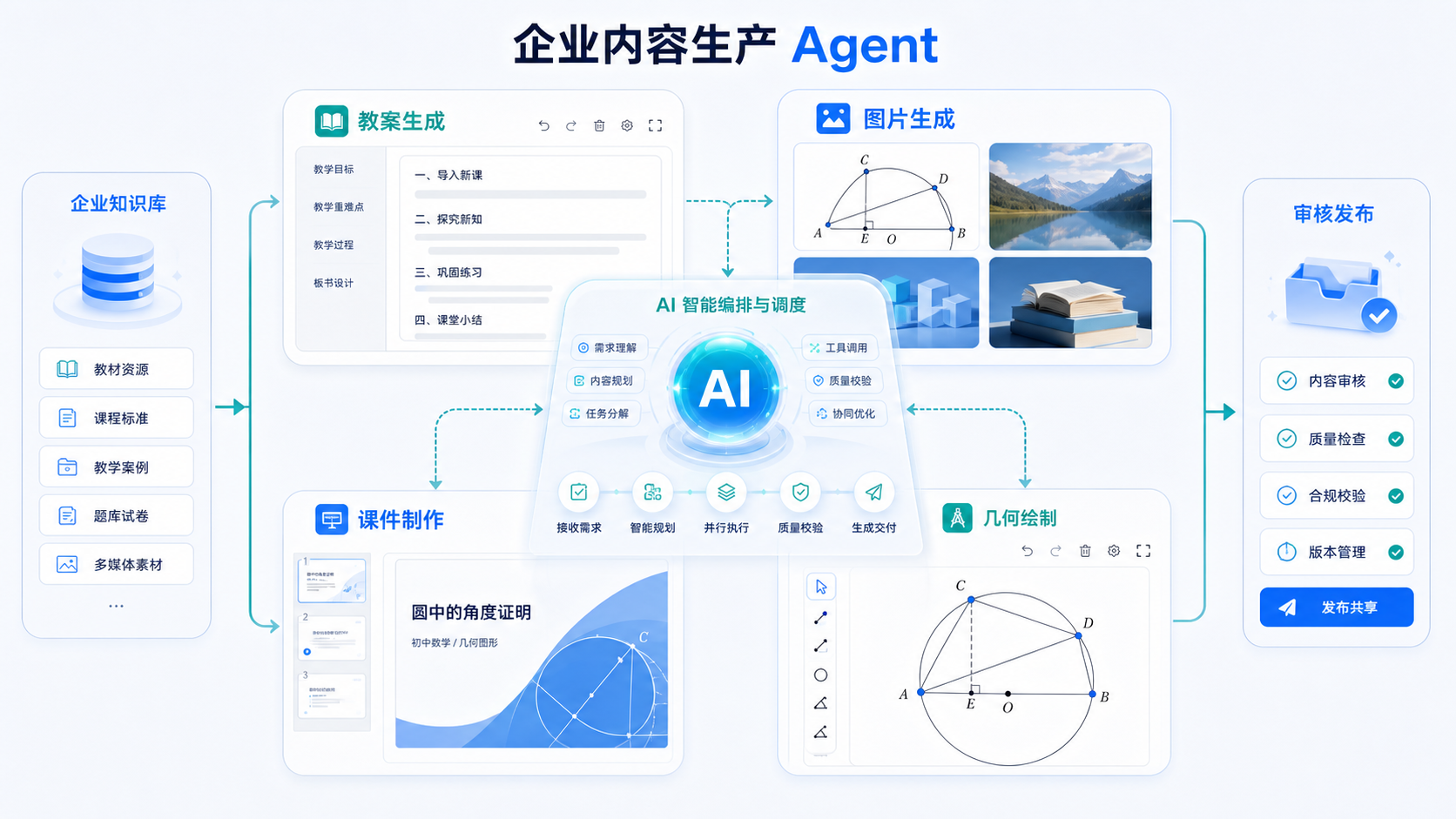
This scenario is for enterprises building their own AI capabilities. Organizations can combine large language models, internal knowledge bases, review policies, and Dino-GSP's open capabilities into a complete production Agent—from understanding a request to delivering finished content—without developing a professional geometry engine from scratch.
Scenario illustration
You may be building
- Enterprise content production Agents
- AI-powered curriculum and lesson-planning platforms
- Educational content production hubs
- Automated textbook, workbook, and courseware production systems
What the Agent can do
- Generate lesson plans and classroom activities from curriculum standards, learning objectives, and enterprise knowledge bases.
- Produce images and visual assets for concepts, examples, and teaching activities.
- Plan courseware structure, generate slide content, and assemble deliverable presentations.
- Detect geometry-drawing requirements and call Dino-GSP to create editable, interactive, professional figures.
Recommended capability units
- AI Agent Geometry Interaction
- Geometry Protocol and JS SDK
- Image and Structured Export
- HTTP API Server-side Integration
Why it fits
- The enterprise retains control of Agent orchestration, knowledge bases, model selection, and business rules, while Dino-GSP supplies the specialized geometry capabilities.
- Lesson plans, images, courseware, and geometry figures become parts of one context-aware workflow instead of disconnected production steps.
- Geometry results can be rendered directly as images while retaining structured data for human review, further editing, and delivery across devices.
- Human approval and enterprise policy checks can be inserted at critical stages to balance automation efficiency with content quality.
Typical workflow
- A curriculum specialist provides the grade, topic, lesson objectives, and content requirements.
- The enterprise Agent retrieves internal knowledge and generates the lesson structure, explanations, and courseware outline.
- The Agent analyzes asset requirements for each section and invokes image generation, courseware production, and Dino-GSP capabilities as needed.
- Dino-GSP generates structured geometry from natural language or a reference image, then outputs a preview image or interactive project.
- The Agent assembles the content, runs enterprise policy checks, and sends it to curriculum specialists for approval and publishing.
5. Lesson Plan and Courseware Authoring Tools
This scenario serves content producers. The emphasis is production efficiency, lower repetitive effort, and easier geometry reuse across systems.
You may be building
- Lesson-plan authoring platforms
- Courseware production tools
- Curriculum collaboration systems
- Content production back offices
Recommended capability units
Why it fits
- Professional geometry editing becomes a built-in part of the content workflow.
- Figures can be delivered as images while preserving structured outputs for later editing.
- For high-volume teams, the Agent API can auto-generate a geometry draft from a text description, which authors then refine in the embedded editor.
Typical examples
- A teacher edits a geometry figure directly inside a lesson-prep system and exports it into a courseware page.
- A curriculum team builds a reusable library of structured geometry assets inside its own content platform.
- A content editor types a problem description, the backend calls the Agent API to produce a geometry draft, and the editor fine-tunes it in the canvas before publishing.
6. Independent Developers and Math Innovation Tools
If your innovation is a new interaction, analysis method, or subject-specific application, it is usually better to reuse the underlying geometry infrastructure directly.
You may be building
- Function-graph tools
- Theorem verification tools
- Math lab applications
- Vertical math products
Recommended capability units
Why it fits
- You can focus on your own algorithms, interaction model, or product design while reusing low-level rendering and geometry constraints.
- This is often the fastest way to validate a new product direction before deepening the integration later.
- The HTTP API offers a frontend-free integration path, making it convenient for CLI tools, scripts, or pure backend applications.
Typical examples
- A theorem-verification tool generates figures through structured protocol data and renders final results through export capability.
- A math lab app uses the SDK to control parameter changes and reflect them on the canvas in real time.
- A command-line script batch-processes natural language problem descriptions through the Agent API to generate geometry projects and render them as PNGs for archival.
How to choose an integration path
| Your goal | Start here |
|---|---|
| I only need to show dynamic figures | Embedded Presentation Canvas |
| I need editing and content production in my own system | Embedded Editor Canvas |
| I need code-level canvas and data control | Geometry Protocol and JS SDK |
| I need AI to call geometry during conversation or reasoning | AI Agent Geometry Interaction |
| I need image or structured outputs | Image and Structured Export |
| I need backend batch generation or rendering of geometry | HTTP API Server-side Integration |
| I need to generate geometry from text or images (no frontend) | HTTP API Server-side Integration (Agent API) |
Continue from the scenario view
- To understand each capability unit in more detail: see Capabilities
- To move directly into engineering docs: see SDK Docs
- To focus on AI and agents first: see REPL Capabilities
- To integrate the HTTP API (AI Figure Generation / Rendering): see API Docs
- To integrate via MCP / AI client tools: see AI Integration